
About Tagaini Jisho
Tagaini Jisho is a free, open-source Japanese dictionary and kanji lookup tool for Windows, MacOS X and Linux and aims at becoming your Japanese study assistant. It allows you to quickly search for entries and mark those that you wish to study, along with tags and personal notes. It also let you train entries you are studying and follows your progression in remembering them. Finally, it makes it easy to review entries you did not remember by listing them on screen or printing them on a small booklet.
Tagaini Jisho also features complete stroke order animations for more than 6000 kanji.
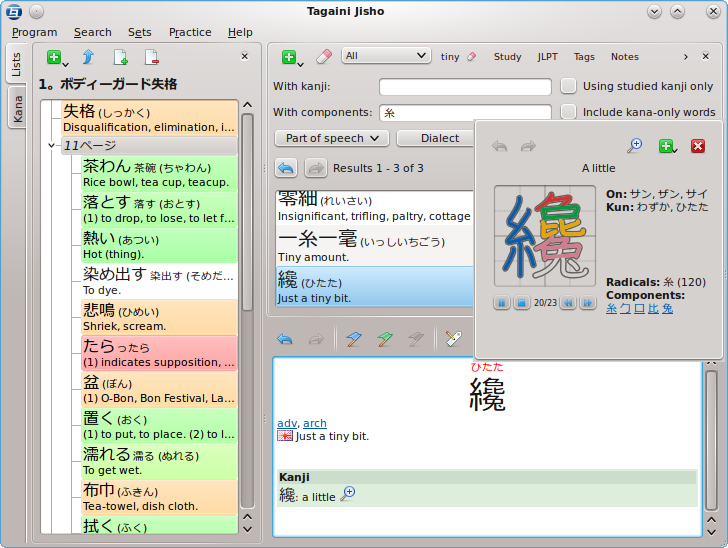
Features
- Powerful searching options for both vocabulary and kanjis, such as part-of-speech, JLPT level, etc.
- Presentation of results that focuses on the entries you need to study,
- Lot of context information related to your study, like transitive/intransitive equivalents of verbs, studied words using a given kanji, etc.
- Kanji stroke order animations for more than 6000 kanjis,
- Tagging and notes,
- Flashcard-like training modes,
- Printing of foldable pocket booklets for offline study,
- Interface available in English or French, dictionaries partially translated to languages other than English,
- …
Want to try it? Download it for your system!
Licence
Tagaini Jisho is Free Software distributed under the terms of the GNU General Public Licence, version 3.
Credits
Tagaini Jisho is powered by Qt and SQLite.
Tagaini Jisho uses data from various sources. They include:
- The JMdict project,
- The kanjidic2 project,
- Kanjis stroke animations data come from the KanjiVG sister project,
- JLPT levels for (old) levels 4, 3 and 2 come from the JLPT study page, with kind autorization. Level 1 vocabulary was extracted from lists provided by Thierry Bézecourt and Alain Côté. Levels for N3 come from the JLPT Resources page, which has also been used to fine-tune other levels.
- Extra translations for vocabulary and kanji meanings are provided by the jmdict-i18n and kanjidic2-i18n projects.
The idea of starting this project has come after more than one year of intensive usage of the great Kangoroo dictionary.